Recurring Visitor Invitations (Longterm Invite)
Last updated: October 21, 2026
With a recurring invitation, you invite a visitor once for a longer period – for example every weekday for 1–3 months. This is ideal for regular external visitors like cleaning staff, contractors or consultants. Recurring visitors don't need a PULT account; they check in at the kiosk or via QR code as usual.
Create a recurring invitation
In the PULT web app, go to Visitors → + Invite Visitor and fill in the visitor details (see How to Invite Visitors in PULT).
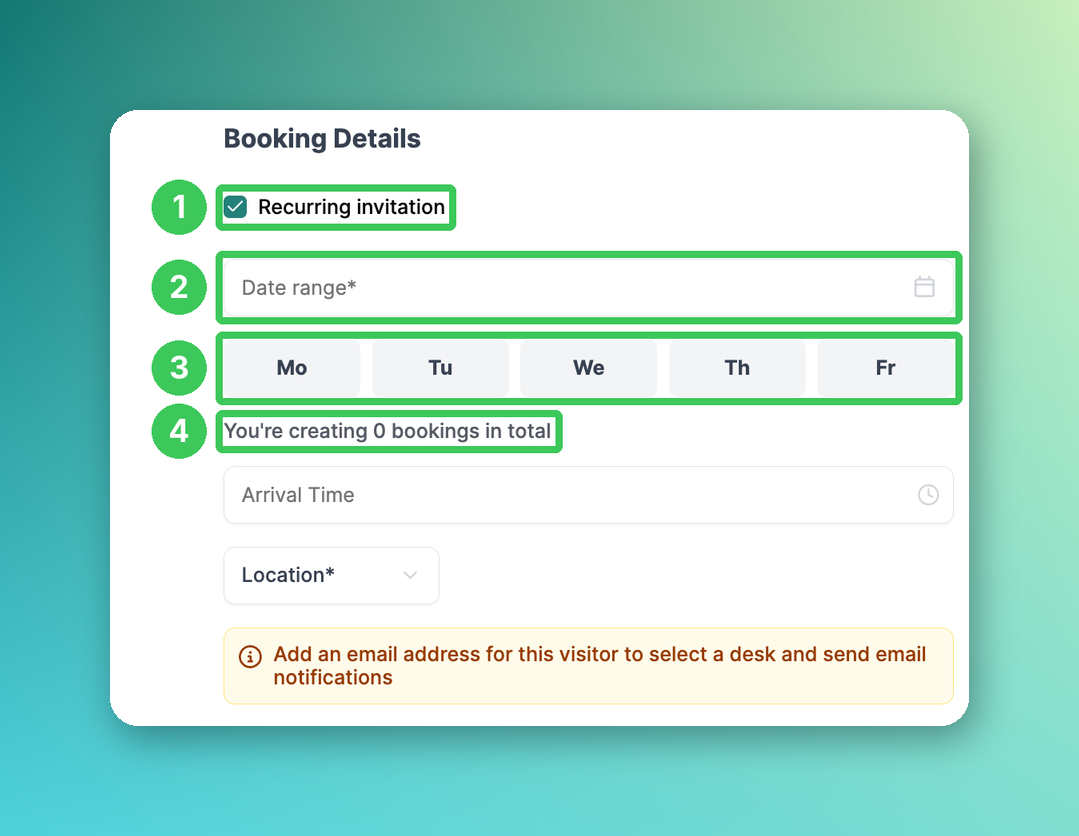
1. Recurring invitation
Tick the box Recurring invitation.
2. Date range
Select the start and end date of the series.
3. Days
Select the weekdays on which the visitor comes, e.g. Mo–Fr.
4. Number of bookings
Shows how many visits will be created, e.g. "You're creating 60 bookings in total".
Then select the location (and optionally an arrival time) and click Confirm Invitation. Each selected day creates a separate visit in the visitor overview.
What the visitor experiences
If activated, the visitor receives one invitation email that summarizes the whole schedule – not one email per day.
At the first visit, the visitor goes through the full check-in flow. Which questions and documents are repeated on later visits depends on your flow settings (First visit only and Signature validity, see Visitor Document & Form Settings for Repeat Visits).
Edit or cancel a recurring invitation
When you edit or cancel a visit that is part of a series, PULT asks whether you want to change only this visit or the whole series.
If you cancel the series, all future visits from that point are removed. PULT shows how many visits will be cancelled.
Cancelling a single visit does not affect the rest of the series.
Frequently asked questions
Do recurring visitors need a PULT account?
No. Recurring visitors are external guests – they do not need to be added as PULT users.
Can I change the days or date range after creating the invitation?
Cancel the series and create a new one with the updated settings. Single visits can also be cancelled separately.
What happens if I change the visitor flow?
Questions marked First visit only are not asked again. Whether documents have to be signed again depends on their signature validity. If you upload a new version of a document, you decide whether earlier signatures become invalid (see Add documents to flows for Visitors).
Does the visitor get an email for every single day?
No. They receive one email summarizing the entire schedule.
Can I use this for cleaning staff who come every day?
Yes – this is one of the main use cases. Select all weekdays and a date range of 1–3 months.
Related articles
If you have any questions, feel free to contact our support team at support@pult.com.