How to archive / unarchive Users in the Dashboard
Last updated: October 20, 2026
This article shows admins how to archive, unarchive and permanently delete users in the PULT dashboard.
💡 Why archive users? Archiving is useful for former employees or people who temporarily don't need access. Archived users can't use PULT anymore. If needed, you can unarchive them at any time to restore their access.
Archive, unarchive or delete a user
In the PULT dashboard, go to Settings → Employees → Users (see Manage Employees).
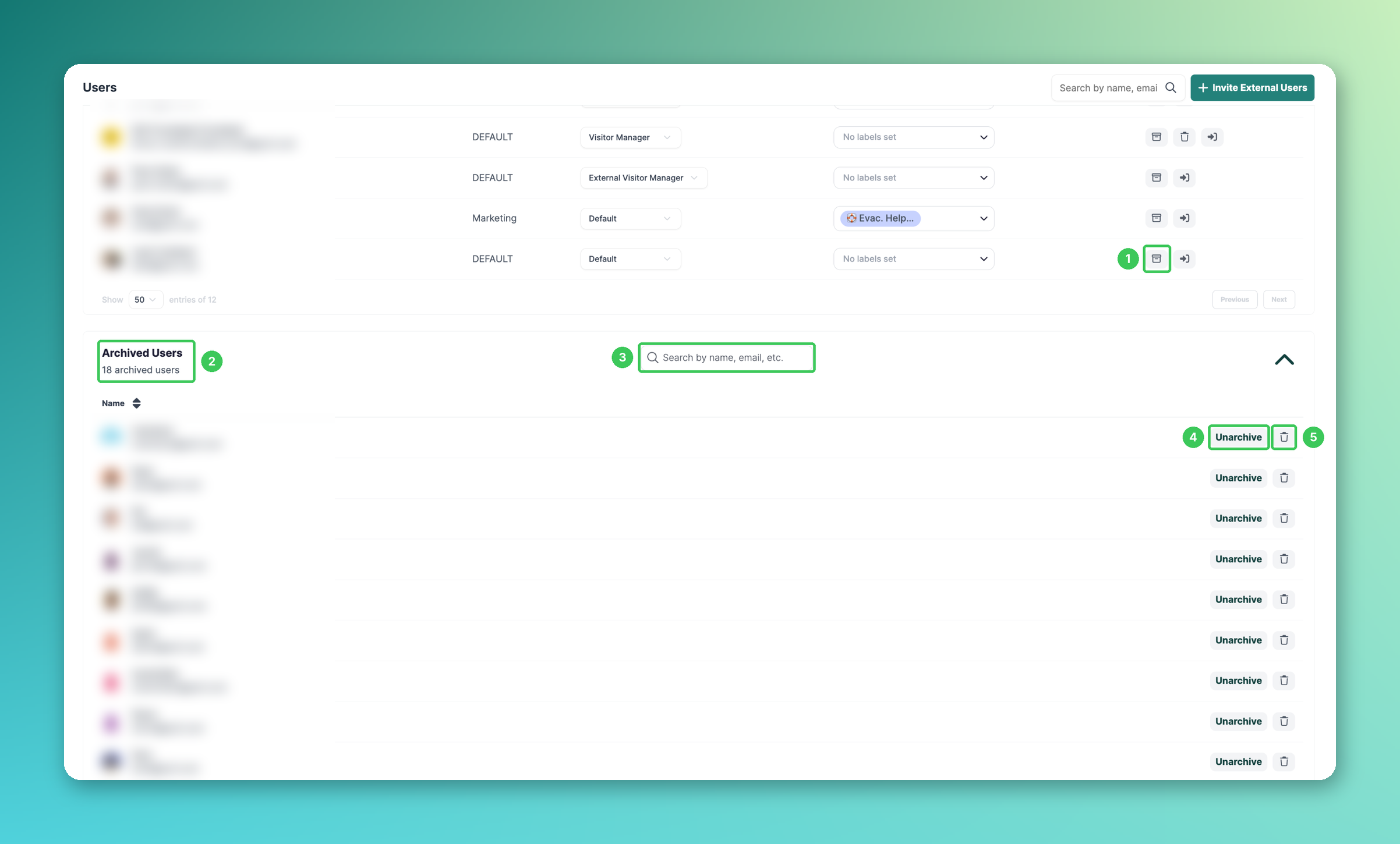
1. Archive a user
Find the user in the list (use the search field at the top if needed) and click the archive icon in their row.
2. Archived Users
At the bottom of the page you find the Archived Users section. The number shows how many users are archived. Click the arrow on the right to expand the list.
3. Search archived users
Search the archived users by name or e-mail.
4. Unarchive
Click Unarchive next to the user to restore their previous access and permissions.
5. Delete permanently
For safety reasons, users can only be deleted once they are archived. Click the 🗑 icon next to the archived user.
❗ Warning: Deleting a user is permanent – all related data and bookings will be lost. Export and save any important bookings beforehand (see Export your PULT bookings).
Frequently asked questions
A user was archived or unarchived automatically. Why?
If you sync users from a directory (e.g. Microsoft Active Directory / Azure), the sync can archive or unarchive users based on the directory. Check the user there first (see Sync Microsoft Active Directory Groups to PULT).
Do archived users count as activated users?
No. Archived users are not counted as activated users in the user overview.
I get "user already exists" when inviting someone. What should I do?
The user is most likely archived. Search for them in Archived Users and click Unarchive.
I can't find the delete icon for an active user.
Archive the user first. The 🗑 icon is available in the Archived Users list.
Are default bookings still created for automatically archived users?
No. Since May, PULT no longer creates default bookings for users who were archived automatically, e.g. by a directory sync (see Default workplace selection).
Related articles
If you have any questions, feel free to contact our support team at support@pult.com.