Room Booking Settings in PULT App
Last updated: October 20, 2026
This article shows admins how to enable PULT Rooms and which room settings are available in the PULT dashboard.
💡 PULT Rooms requires an already configured Google Calendar or Microsoft integration. PULT Rooms can only be used with exactly one resource provider at a time.
In the PULT dashboard, go to Settings → Workplace → Rooms.
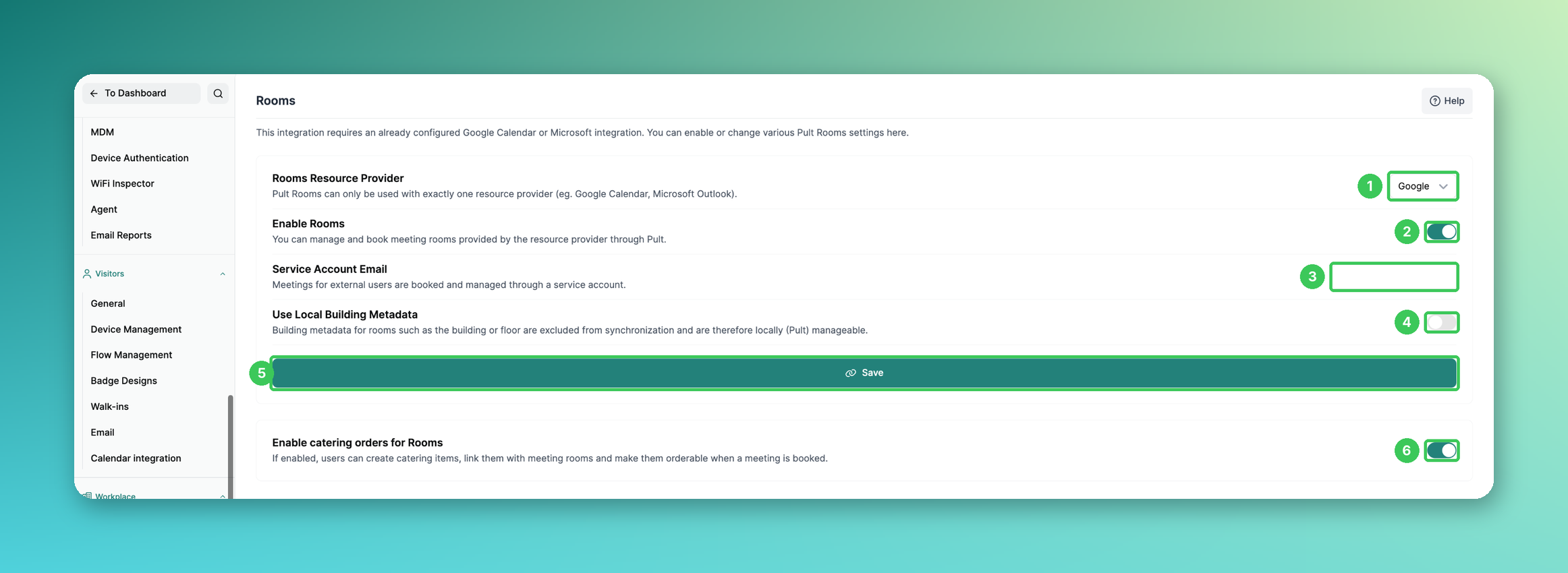
1. Rooms Resource Provider
Choose your resource provider: Google (Google Calendar) or Microsoft (Outlook).
2. Enable Rooms
Switch on the toggle to manage and book the meeting rooms of your resource provider through PULT.
3. Service Account Email
Meetings for external users are booked and managed through this service account.
4. Use Local Building Metadata
If enabled, building metadata such as building or floor is excluded from the synchronization and can be managed locally in PULT.
5. Save
Click Save to apply the settings above.
6. Enable catering orders for Rooms
If enabled, users can create catering items, link them with meeting rooms and order them when booking a room (see Create resources for meeting rooms).
Frequently asked questions
Can I use Google and Microsoft rooms at the same time?
No. PULT Rooms works with exactly one resource provider.
My meeting rooms don't show up in PULT. What should I check?
Make sure the Google or Microsoft integration is connected and Enable Rooms is switched on. New rooms from your calendar can take a while to sync.
Can I change the building or floor of a room in PULT?
Yes, if Use Local Building Metadata is enabled. Otherwise these values come from your calendar provider.
Related articles
If you have any questions, feel free to contact our support team at support@pult.com.