Kiosk Check-In Form for Ad-Hoc / Walk-In Guests
Last updated: May 19, 2026
Overview
The PULT Visitor Kiosk allows walk-in guests - visitors who arrive without a prior invitation to check in directly at your office reception. This is ideal for unexpected deliveries, spontaneous meetings, or any visitor who was not pre-registered in the system.
When a walk-in guest uses the kiosk, they can enter their details manually, sign any required documents (such as a house rules agreement), and notify the host of their arrival — all without needing a pre-sent invitation or QR code.
How It Works — Step by Step
Guest approaches the kiosk
The visitor taps the kiosk screen to begin the check-in process.Select "I don't have an invitation"
On the welcome screen, the guest selects the option for visitors who have not been pre-registered.Enter personal details
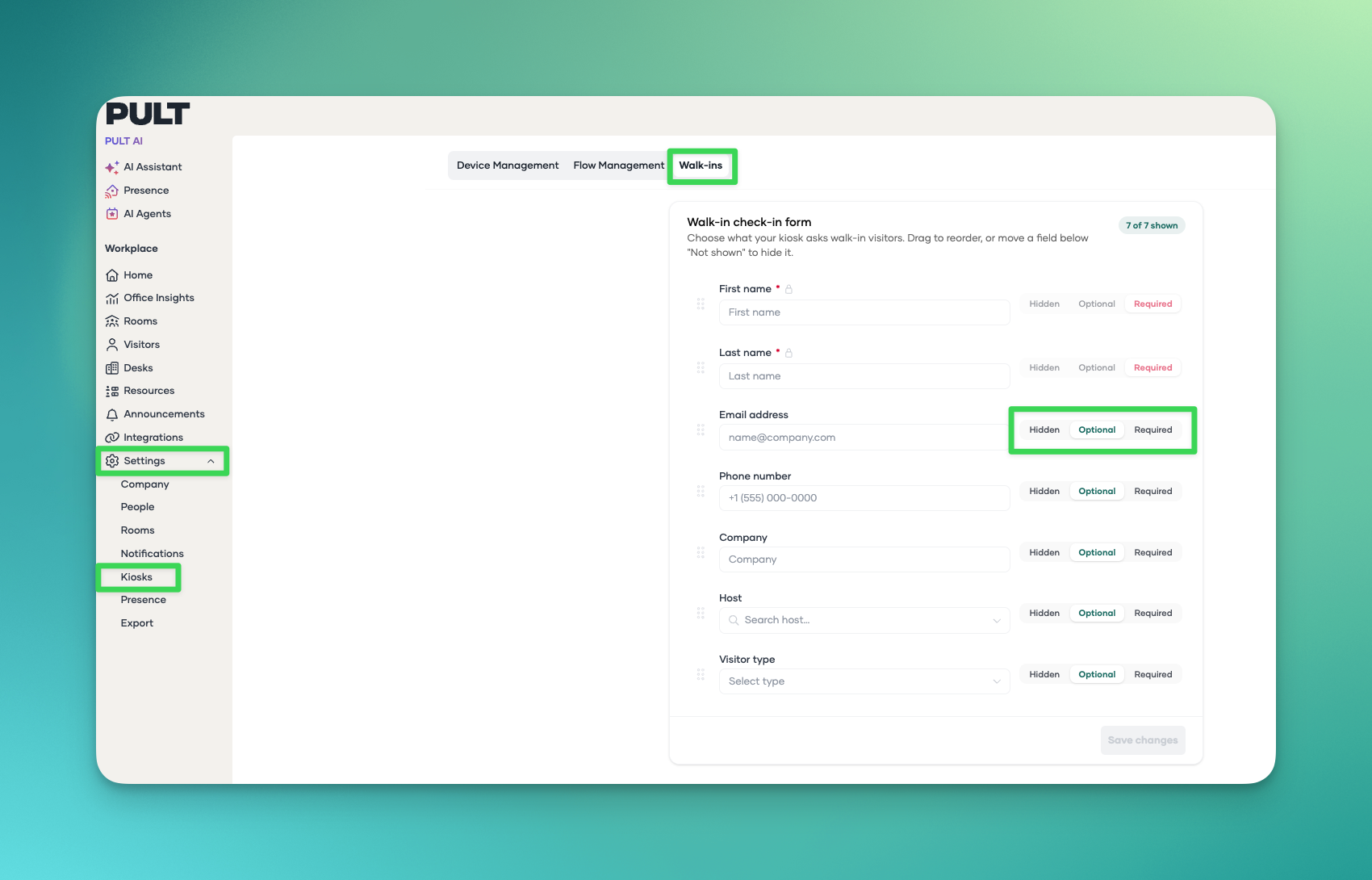
Choose which details are important to know for your company.You can adjust the Ad.hoc form when you go in the dashboard to settings - Kiosk - Walk-ins. Here you can set which details are required, optional or hidden
Sign required documents
If your organization has enabled house rule, NDAs, or other agreements in the Ad-Hoc flow, the guest will be prompted to read and sign them directly on the kiosk screen.Host notification
Once check-in is complete, and the option to select a host is required the host receives a notification (via email or Slack, depending on your settings) that their guest has arrived.Badge printing (optional)
If badge printing is enabled in the Ad-Hoc Flow, a visitor badge is automatically printed for the walk-in guest.
FAQ
Can walk-in guests sign the house rules?
Yes. Walk-in guests who check in via the kiosk are prompted to sign any required documents (e.g., house rules) as part of the check-in flow. This works the same way as for pre-registered guests.
Does the host get notified when a walk-in guest arrives?
Yes. As long as the guest enters the host's name during check-in, the host will receive a notification via the configured channel (email, Slack, etc.).
Can walk-in guests get a printed badge?
Yes, if badge printing is enabled for your kiosk device. The badge will be printed automatically after the guest completes check-in.
What if the guest doesn't know the host's name?
The guest can search for the host by name on the kiosk. If they cannot find the correct person, they should contact the front desk or reception team for assistance.
Is the walk-in guest's visit logged in the system?
Yes. All walk-in check-ins are recorded in the PULT Visitor Management dashboard, just like pre-registered visits. Admins can view and export this data at any time.
Related Articles
Tags Visitor Management, Visitor Kiosk, Walk-In Guests