Pult Admin Settings - Overview
Last updated: October 19, 2026
This article gives you an overview of all available settings for admins in PULT.
To access the admin settings, navigate to Settings in the left-hand navigation of the dashboard. Here you'll find all general settings, including:
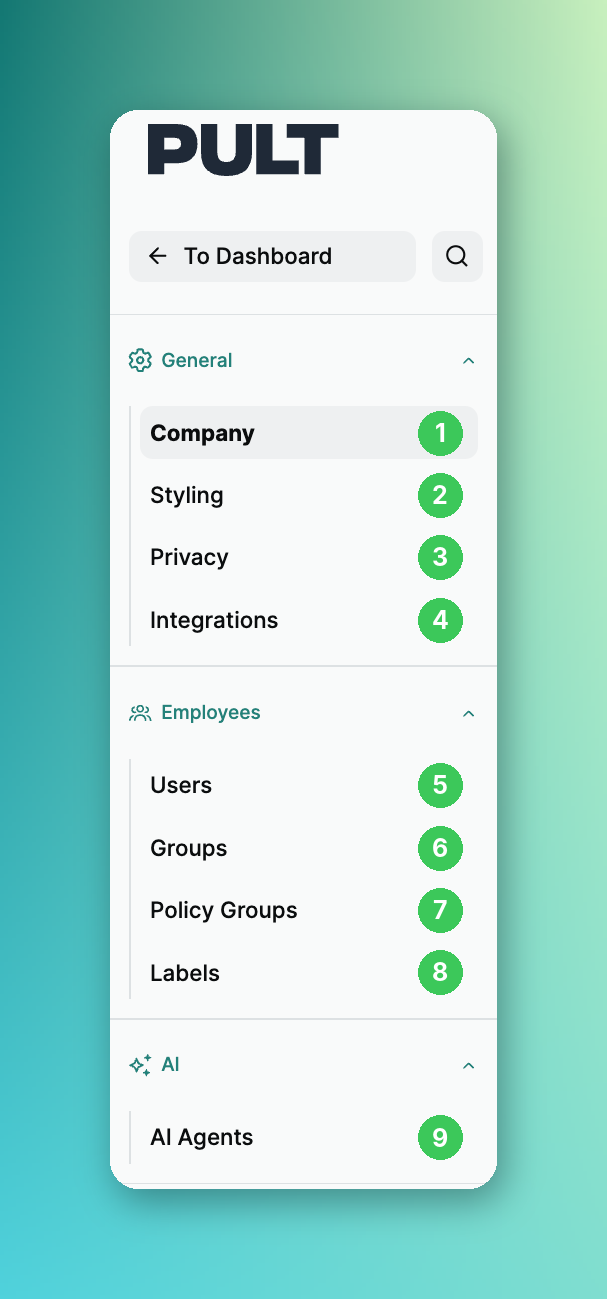
General
1. Company
Define support contact person
Set Public Holiday
2. Styling
Set company name, logo, and global app color
Edit the White-label
Control whether your team sees the new web app design
3.Privacy
Set privacy settings like masking of absences
control visibility of average office use graph
Data Retention of Visitor & Presence data
4.Integrations
Setting up the HR integrations
Setting up the integrations (google, Azure, Slack,.. )
Important: Integrations should be set up first if you want to use the rooms features.
They are the foundation for room sync, resources, and catering.
Employees
5.Users
User overview active users & total users (including archived users)
Admins & Team Leads can log in as users (Team Leads only within their group)
Create external users (highlighted in yellow – users without Google, HR, or Microsoft integration)
💡 Archive = data retained | Delete = data permanently lost
6.Groups
7.Policy Groups
8.Labels
Create some Personal labels that employees can pick from. These labels will then be linked to each employee's profile and will make it easier to gather additional information from each employee.
9.AI Agent
Room Agent
Inventory Agent
Safety Agent
Scenario Planning
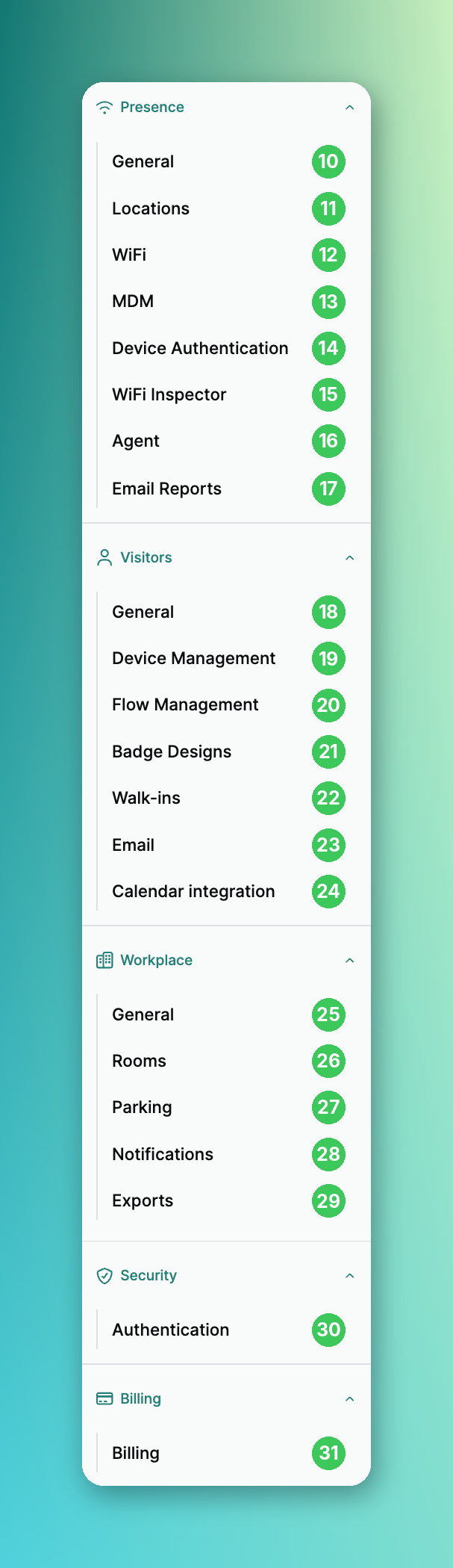
Presence
10. General
WiFi Integration Settings / Automation Settings
Location Mappings
Agent Integration / Automation Settings
11. Locations
Adding and editing Presence Locations
12. WiFi
WiFi Settings
Adding Integrations (Ubiquiti, Aruba Central, Cisco Meraki)
13. MDM
Add & Manage Manual MDM Devices
14. Device Authentication
Pending Agent Device Requests
Request History
Manage Authentication Tokens for automated device registration (Bootstrap Tokens)
15. WiFi Inspector
WiFi Inspector (manage MDM devices & matching)
16. Agent
Insight into users and the PULT Agent info (latest version, activity, etc.)
17. Email Reports
Manage Monthly Team Report
Visitors
18. General
Manage Visitor Settings (guest bookings for admins, restricted guest booking days)
Manage Visitor Check-in & Check-out Settings
19. Device Management
Manage the Kiosk Devices
20. Flow Management
Manage Visitor Flows (NDAs, questions, etc.)
Manage Visitor Types
21. Badge Designs
Design your own visitor badges with the Badge Editor and assign them to your visitor flows
22. Walk-ins
Manage Walk-in Check-in Form for ad-hoc guests
23. Email
Preview the visitor emails (Invitation & Signed Document Email)
Add a company logo to the invitation
Set a default email language
24. Calendar Integration
Manage the Visitor Calendar Integration
Workplace
25. General
Manage booking setup (restricted bookable days, default bookings, Frontdesk users, bookable weekends)
Set Booking Options (Vacations, Coworking, Remote, Business Trip, Sick and Absent)
26. Rooms
Manage Room Integrations (this integration requires an already configured Google Calendar or Microsoft integration — you can enable or change various PULT Rooms settings here)
Enable catering orders for rooms
27. Parking
Manage recurring parkings and parking cancellation
28. Notifications
Manage Booking Confirmations
Check-in Reminders
Enable parking spot notifications
29. Exports
Download booking and parking exports as CSV
Security
30. Authentication
Choose which sign-in methods members of your organization can use (Google, Microsoft, Slack, Okta, email magic link)
Changes only apply to new sign-ins; active sessions stay signed in
Billing
31. Billing
View invoices
Update payment method
Manage subscription
If you have any questions, don't hesitate to reach out to our support team.